Digital Coaching Clipboard & Play Designer

Turn a coaching idea into a play your team can follow. The BASE digital clipboard puts drawing, player positions, and animated movement inside your team workspace.

Create your BASE accountGet BASE on Google Play

Inside BASE

Build a play on a sport board

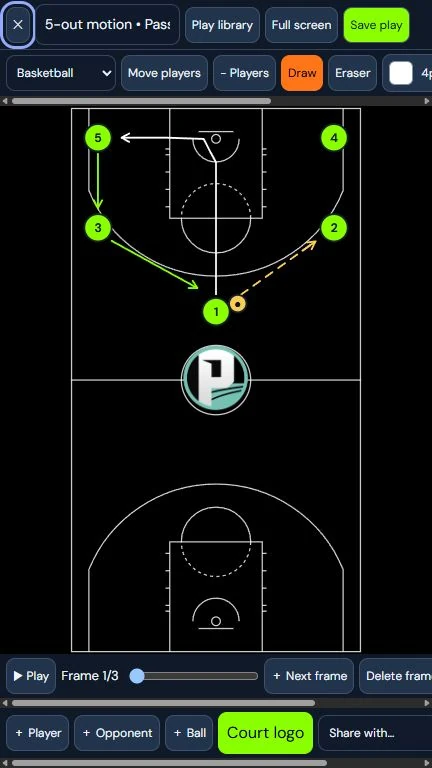
Open the clipboard from your team, select a supported sport board, and arrange players and the ball. Draw the paths and marks you need to explain the plan.

Show how the play moves

Animate movement to walk through the sequence of a play. Use the clipboard when preparing practice or explaining a game situation to the team.

Save your coaching work

Save plays for later and choose whether to keep a play private or share it with the team. Your coaching plans stay close to team communication and schedules.


More ways to bring your team together

Sports Team Communication App

Keep coaches, players, and families connected with BASE team chat, announcements, photos, and private or group conversations.

Explore this feature →

Team Scheduling & Attendance App

Organize games and practices, import schedules from photos, and track team RSVPs and attendance with BASE.

Explore this feature →

Digital Coaching Clipboard & Play Designer

Draw plays, position players, animate movement, and save or share your coaching plans with the BASE digital clipboard.

Explore this feature →

Team Stats & Digital Scorebook

Keep game scoresheets, past results, player statistics, and season leaders together with the BASE team scorebook.

Explore this feature →

Sports Team Payments, Tickets & Fundraising

Collect team fees, sell spectator tickets, and share team fundraisers with BASE and a connected Stripe account.

Explore this feature →

Live Game Streaming for Sports Teams

Broadcast games from your phone with BASE. Choose team-only or public viewing and share a live game link with families and supporters.

Explore this feature →